NAS & remote connections
Press 4 for your connections. strata mounts SMB and NFS shares, and browses SFTP, S3, WebDAV, FTP and any rclone remote (Google Drive, OneDrive, Dropbox, Backblaze B2…) right in its panels.
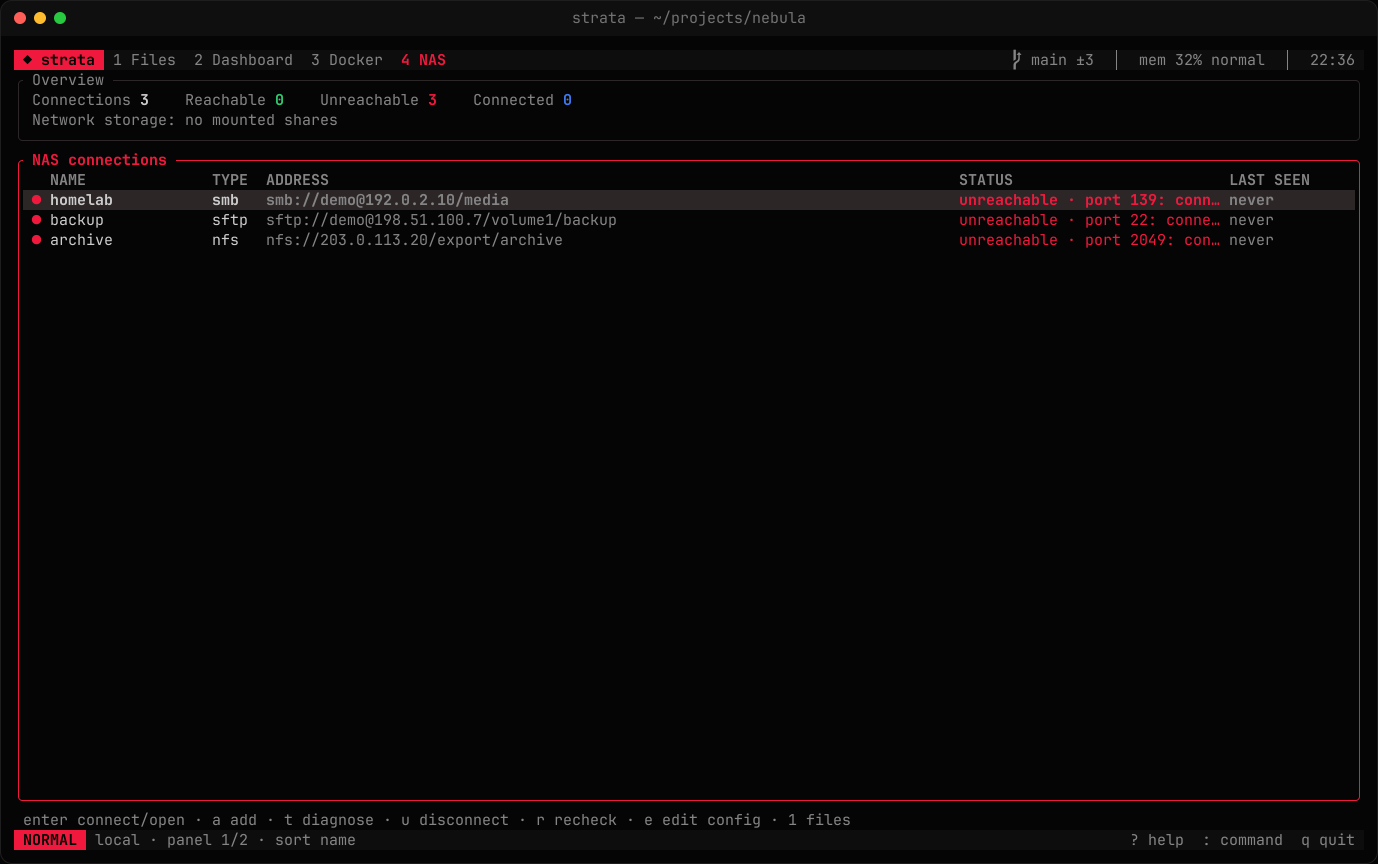
Each connection shows whether it is mounted or connected, whether the server answers (and how fast), and when it was last reachable. Status is re-checked every 15 seconds; the sidebar's Network section shows the same coloured dots.
Adding a connection
Press a and enter a URL, then a name:
smb://me@192.168.0.10/media
nfs://nas.local/export/backup
sftp://me@nas.local:2222/volume1
s3://my-bucket/backups                       # AWS
s3+http://ACCESSKEY@minio.local:9000/bucket  # MinIO, R2, B2… (s3+https:// for TLS)
davs://me@cloud.example.com/remote.php/dav/files/me   # WebDAV over https (dav:// for http)
ftp://me@ftp.example.org/pub                 # ftps:// for FTP over TLS
rclone://gdrive/Photos                       # a remote from `rclone config`
You can also open a URL directly with :connect <url>. The host can be an IPv4 or IPv6 address or a name. Connections are saved to config.toml:
[[connections]]
name = "homelab"
protocol = "smb"          # smb | nfs | sftp | s3 | webdav | ftp | rclone
host = "192.168.0.10"     # S3: the endpoint; rclone: the remote's name
share = "media"           # share (SMB), export (NFS), start directory (SFTP, FTP, rclone),
                          # /bucket/prefix (S3) or the server path of the WebDAV root
user = "me"
port = 445                # optional: the protocol's usual port otherwise
domain = "WORKGROUP"      # SMB only, optional
mount_point = "~/mnt/homelab"   # optional
identity_file = "~/.ssh/id_ed25519"   # SFTP only, optional
auto_connect = false
tls = true                # S3, WebDAV and FTP: encrypt (default on, off for FTP)
Keys
| Key | Action |
|---|---|
| enter | Connect (SFTP, S3, WebDAV, FTP, rclone) or mount (SMB/NFS), then open it |
| i | Save a host from ~/.ssh/config to config.toml |
| t | Diagnose step by step |
| u | Disconnect or unmount |
| p / f | Save / forget the password in the system keychain |
| r | Re-check every connection |
| e | Edit config.toml |
SSH config hosts
The Host aliases in ~/.ssh/config (and the files it Includes) are listed after your saved connections, marked ~/.ssh/config, ready to open. strata uses their HostName, User, Port and IdentityFile. A saved SFTP connection whose host is an alias gets the same settings, but its own user, port and identity_file win. Press i to save an alias to config.toml: only the alias is stored, so ~/.ssh/config stays the place its settings live.
Hosts reached through ProxyJump or ProxyCommand are listed but can't be opened yet: strata says so instead of connecting directly. Match blocks are not evaluated.
Host keys
Before sending a password or key, strata checks the server's host key against ~/.ssh/known_hosts (and /etc/ssh/ssh_known_hosts), the same way ssh does, hashed entries included.
- A known key connects quietly.
- A new server shows its key type and
SHA256:fingerprint and asks you to trust it. Press y only if the fingerprint matches the server's. The key is then added to~/.ssh/known_hosts. - A changed or revoked key is refused with a warning, since someone may be intercepting the connection. strata won't let you skip that warning. If the server's keys really changed, check the new fingerprint, run
ssh-keygen -R <host>(orssh-keygen -R '[host]:port') and connect again.
How connections work
- SFTP runs inside strata: no mounting, no root. Once the host key checks out, strata tries your SSH agent, then your keys in
~/.ssh(oridentity_file), then a password saved in the keychain, and finally asks you. After a successful password login it offers to save it. - SMB mounts with
gio mounton Linux desktops (no root needed),mount -t cifsotherwise,mount_smbfson macOS andnet useon Windows. - NFS mounts with
mount -t nfs. - S3, WebDAV, FTP and rclone remotes run inside strata through the
rclonecommand, which must be installed. Listings load in the background; each operation starts rclone once, so expect a short pause per folder. Copies between two rclone-backed panels (say S3 to WebDAV) are handed to a singlerclone copy, which copies on the server when both sides are the same provider and otherwise streams directly, without staging files on your disk. Two connections of the same kind with different passwords can't share one rclone call; those copies stream through strata instead.- S3 uses the access key in the URL (
user) with its secret key from the keychain or a prompt. Without an access key it uses yourAWS_*variables or~/.awsprofiles. Asking the EC2 metadata service is off unless you setAWS_EC2_METADATA_DISABLED=false. - WebDAV and FTP ask for a password when the server refuses the login, and offer to save it. FTP without a user logs in anonymously.
- rclone remotes keep their own settings and credentials in rclone's config (
rclone config). - Secrets reach rclone through environment variables, never its command line.
- S3 uses the access key in the URL (
Mounting hands the terminal to the mount command, so sudo and the server can ask for passwords as usual.
Passwords and the keychain
Passwords are never written to strata's own files. They live in your operating system's keychain: Keychain on macOS, Credential Manager on Windows, and the Secret Service (GNOME Keyring or KWallet) on Linux. When mounting, strata passes a saved password through stdin or a private, temporary credentials file where the platform allows it — never on the command line on Linux.
Diagnosing a connection
t walks the chain a connection takes and reports each step: resolving the server's name, reaching it (falling back from port 445 to 139 for SMB), the mount point, and the share. For SFTP it shows what ~/.ssh/config changed and whether the server's host key is known, new or changed. For rclone-based connections it checks that rclone is installed and, for rclone remotes, that the remote is configured. Steps that cannot run because an earlier one failed are marked as skipped instead of guessed at.