Finding your way
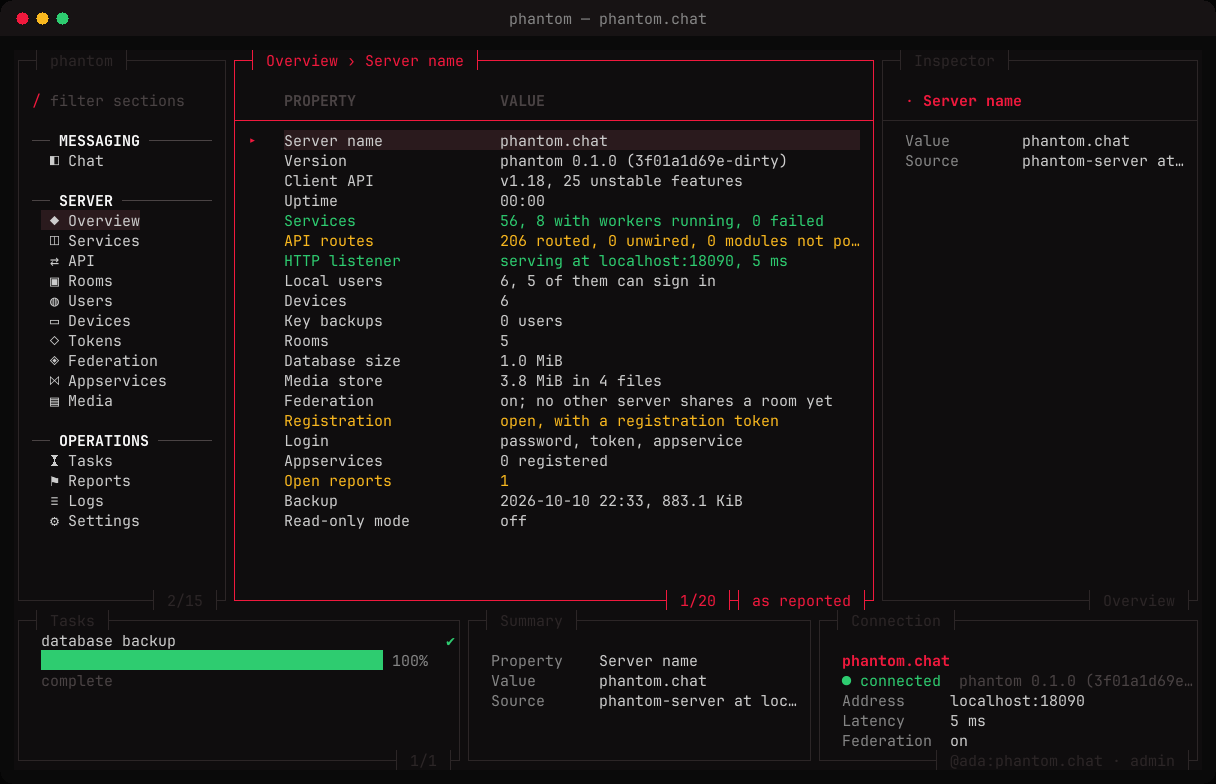
The layout
- Sections on the left: Chat, then the server (Overview, Services, API, Rooms, Users, Devices, Tokens, Federation, Appservices, Media), then operations (Tasks, Reports, Logs, Settings).
- The table in the middle, for the open section. The footer shows your position, and how the rows are sorted — or why they aren't live.
- The inspector on the right, with every detail of the row under the cursor.
- The footer: running tasks, a summary of the selection, and the connection.
Moving around
Focus moves between the sections, the table and the task box with L and H (or ctrl+→ and ctrl+←). Within a list, j / k or the arrows move, g and G jump to the ends, enter opens.
Tabs
n opens the section as another tab beside the current one, tab and shift+tab move between tabs, w closes one. Up to three fit, if the terminal is wide enough.
Filter, sort, refresh
- / filters the rows as you type; esc clears it.
- s sorts by the next column, ascending then descending, then back to the server's order.
- r fetches the section again. The open section also refreshes with every probe.
? shows every key.