Quick start
This page takes you from an empty file to a typed, running LuaScript program in a few minutes. It assumes you have a luascript binary on your PATH. If not, see Installation. Inside a clone of the repository, go run ./cmd/luascript works anywhere this page says luascript.
Hello, world
LuaScript source files use the .lsc extension. Create hello.lsc:
print("Hello, LuaScript!")Run it by passing the file to luascript:
luascript hello.lscHello, LuaScript!There is no main function and no boilerplate. As in Lua, a file is a chunk, and its top-level statements run from top to bottom.
Useful run flags
| Command | What it does |
|---|---|
luascript -time app.lsc | Run the script, then print how long it took. |
luascript -watch app.lsc | Re-run the script every time you save it. Press Ctrl+C to stop. |
luascript -dis app.lsc | Print the compiled bytecode instead of running the script. |
-time and -watch can't be combined. The full list is in CLI & tooling.
The REPL
Run luascript with no arguments to start the interactive REPL:
luascript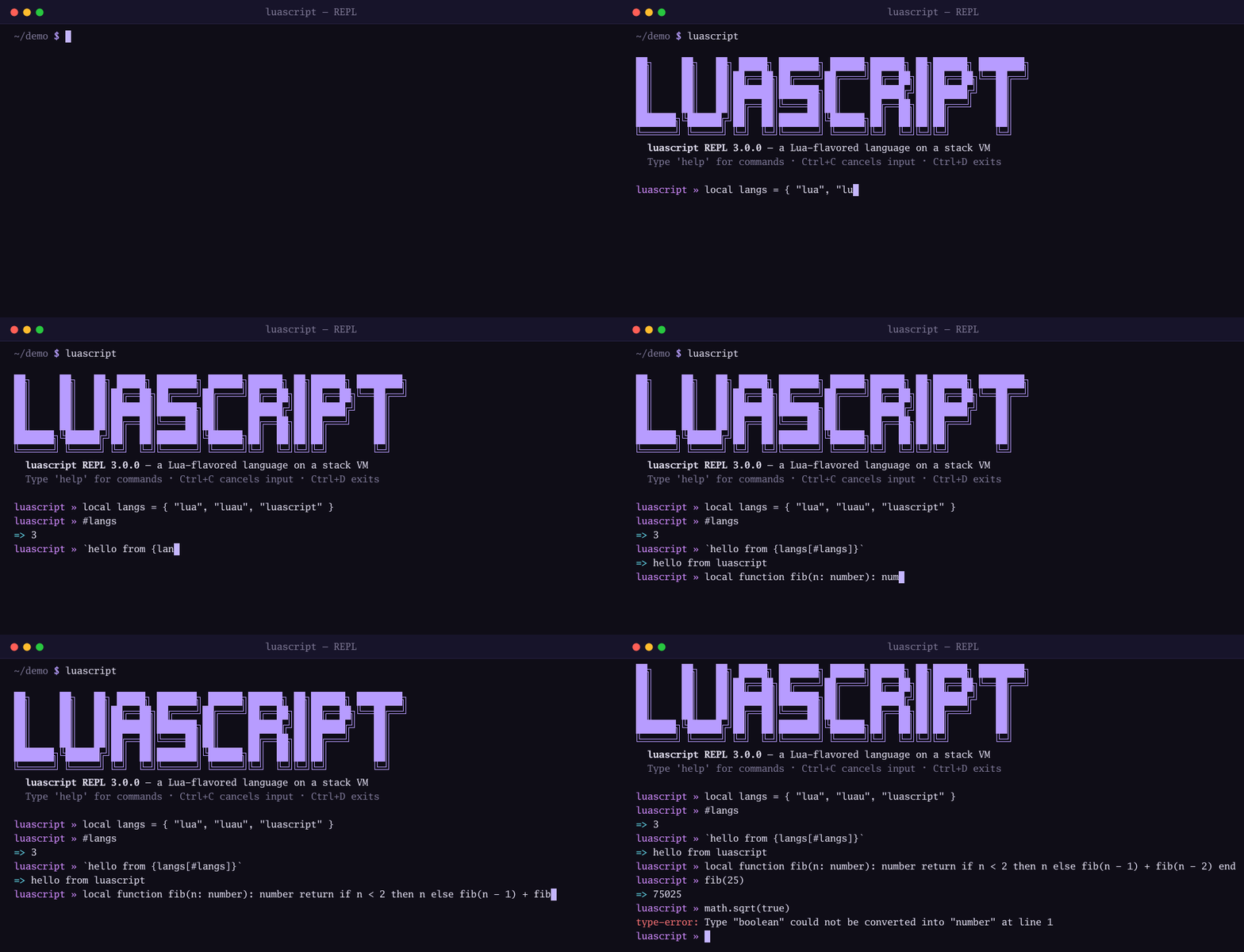
A few things make the REPL pleasant to use:
- Bare expressions print their value. Type
1 + 2and you get3. You don't needprint. - Top-level
localpersists.local x = 10in one input is still visible in the next. Inside a nested scope (adoblock,if, loop or function body),localbehaves as it does in Lua. - Multi-line input just works. If the input is incomplete, such as a
functionwithout itsend, the REPL opens a continuation prompt until the statement is finished. - Types are checked.
local x: number = "a"is reported with atype-error:prefix and never runs.
| Command | Effect |
|---|---|
help | Show the help screen. |
doc <topic> | Look up the standard-library reference, for example doc string.format. A bare doc lists every topic. |
reset | Rebuild the VM, clearing all globals and user state. |
clear | Clear the screen. |
exit, quit | Leave the REPL. |
Ctrl+C cancels the current input, Ctrl+D exits, Ctrl+R searches history and Tab completes keywords. History is saved to ~/.lsc_repl_history.
Your first typed function
Type annotations are optional. Add them where they help, and the checker verifies every call before the program starts.
local function greet(name: string, times: number = 1): string
    local parts = {}
    for i = 1, times do
        parts[#parts + 1] = `hello, {name}!`
    end
    return table.concat(parts, " ")
end

print(greet("Ada"))        --> hello, Ada!
print(greet("Grace", 2))   --> hello, Grace! hello, Grace!
This example uses three LuaScript features:
name: stringand): stringannotate the parameter and return types.times: number = 1is a default parameter. The default applies when the argument isnilor missing.`hello, {name}!`is string interpolation.
Now add a bad call at the end of the file:
print(greet(42))Running the file again fails before anything prints. Even the two valid calls above it don't run:
luascript: Type "number" could not be converted into "string" at line 11This is the core trade of gradual typing. Untyped code stays dynamic (an unannotated parameter is any), and typed code is checked at compile time. Types are erased before bytecode, so annotations cost nothing at run time.
Stricter checking
Put --!strict on the first line to make missing parameter annotations an error:
--!strict
local function double(x)
    return x * 2
end
print(double(21))
luascript: parameter "x" has no type annotation (--!strict) at line 2The other directives are --!nonstrict (the default) and --!nocheck (skip the type pass entirely). See Strict mode.
A quick tour
Here are a few more things you will use often, each with its own page.
Structs and native modules. struct declares a nominal record type with positional or named construction. require loads one of the built-in native modules, here json:
local json = require("json")

struct User {
    name: string,
    age: number,
}

local users = {
    User("Ada", 36),
    User{ name = "Grace", age = 45 },
}

local names = {}
for _, u in ipairs(users) do
    names[#names + 1] = u.name
end

print(json.encode({ count = #users, names = names }))
--> {"count":2,"names":["Ada","Grace"]}
Error handling. Alongside Lua's pcall and error, LuaScript has a real try / catch / throw:
local function parse_age(s: string): number
    local n = tonumber(s)
    if n == nil then
        throw `not a number: {s}`
    end
    return n
end

try
    print(parse_age("42"))      --> 42
    print(parse_age("forty"))
catch err do
    print("caught:", err)       --> caught:	not a number: forty
end
Modern conveniences. Compound assignment and if-expressions save a lot of boilerplate:
local total = 0
for _, n in ipairs({ 3, 1, 2 }) do
    total += n
end
local label = if total > 5 then "big" else "small"
print(`total = {total} ({label})`)   --> total = 6 (big)
Where to read more:
| Topic | Page |
|---|---|
| Values, variables, loops | Basics |
| Closures, varargs, default parameters | Functions |
| Tables and metatables | Tables & metatables |
| Interpolation and Lua patterns | Strings |
?., ??, |>, destructuring, spread, defer, continue | Modern syntax |
pcall, try / catch, tracebacks | Errors |
require and package.path | Modules |
| Annotations, unions, narrowing | Types |
struct, enum, match, generics | Structs, Enums, Match, Generics |
Writing tests with luascript test | Testing |
The examples folder
The repository's examples/ directory holds more than sixty numbered, runnable programs that double as a tutorial series. They range from 01_basics.lsc and 02_functions.lsc through types (05_types.lsc, 42_structs.lsc, 44_match.lsc, 45_generics.lsc) to one file per native module (13_json_module.lsc, 57_db_module.lsc, 47_ndarray_module.lsc, and so on). Most run directly from the repository root:
luascript examples/05_types.lscA few need extra setup: 31_ui_module.lsc needs a -tags luascript_ui build, 53_plugin.lsc needs cgo on Linux, macOS or FreeBSD, and 16_httpserver_module.lsc only binds a port when HTTPSERVER_DEMO=1 is set. examples/README.md has an index of what each file shows.
examples/tests/ is a small real test suite you can run with the built-in test runner:
luascript test examples/tests